Five Reasons To Professionalize Your Business’ Facebook Page
Social media plays a major role in helping small business owners promote their brand’s message and connect with their target audience.
So why not update your business’ Facebook page and give your audience a reason to connect?
Below are five reasons to professionalize your business’ Facebook page and quick tips to help you make a few simple adjustments.
1. Increase the Chance of Being Found Online
Think of your website as a destination and each page that mentions the company’s name and links back to the homepage is a road leading others to your digital home.
Your Facebook page can be a well-built road if you add a little SEO-friendly content. Use the About section to tell people what you do and who you do it for, and be sure to utilize keywords, the phrases that your audience uses to find your website, in this section.
Take Target’s Facebook page as an example. The About section states: “Expect More, Pay Less. We hope you find something you ‘Like’”. This simple, yet to-the-point, sentence states the company’s branding message and encourages Facebook participation.
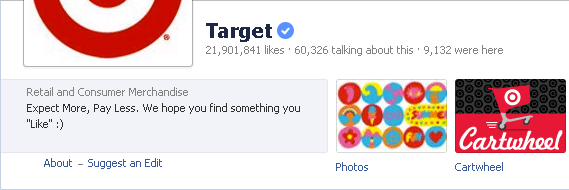
Start with a short and sweet sentence like the above example. You can always add more information under the description section (a part of your About tab).
2. Another Opportunity to Manage Your Reputation
A small business can use their Facebook page for reputation management. If you have an active page, your fans will engage and offer feedback. Even disgruntled feedback can be good for business if you take advantage of it.
Customers have a place to vent if a service or product is not up to speed, and you will have a chance to make the situation right in a timely manner. This not only tells upset customers that you care about their needs, but it shows anyone who follows you that your company will do what it takes to continue earning their business.
The social media management system, HootSuite, receives a lot of online praise for their tool. They make it easier to share updates on various social media accounts. Users can log into one platform and post to Facebook as well as several other social media sites. When the product went down one day, they were flooded with complaints.
HootSuite used that opportunity to let their users know what was happening and kept their fans in the loop as they made the updates. Their audience still felt frustrated, but they weren’t left in the dark about the situation – they were connected.
Problems happen in life and in business, but you can use your Facebook page to get on top of it and promptly manage your small business’ reputation -- especially in a crisis.
3. Create an Engaging Playground
In an article on Forbes.com, Cheryl Conner shares some tips from Ramon Ray’s new book, The Facebook Guide to Small Business Marketing. According to Ray, you need content and engagement via contests, polls, questions, videos as well as great looking photos so that your audience has something to do while they’re on your page. This also gives them a reason to come back.
As a simple way to begin engagement, update your Facebook page daily. Provide links to your most recent articles and include enticing pictures of your company’s employees, fans or products.
Ann Kelle shows how to do this on her Facebook page. The company sells fabric, notebooks, personal stationery, scrapbook and other similar items, so Ann posts bright and fun fabric swatches to alert everyone that the product will be for sale soon. One such post, “All month I’ll be sharing my new fabric collections. First up, Urban Zoologie on flannel!” garnered 102 likes, 13 comments and two shares.
Not only does this post provide a cute picture of a product that can be purchased shortly, it also tells the readers to come back to the page again to check out other soon-to-be released collections.
4. Create an Interactive Space for Local Business Reviews
When it comes to local business reviews, Daniel Kehrer believes the most influential reference is “a simple whisper in the ear.” While referencing the Harris Interactive Study from 2011, Kehrer says “three out of four local customers (75 percent) still recommend businesses by word-of-mouth.”
Since Facebook recently launched a new mobile design that makes your page easier to use on a smart phone, you only need to fill out your About page, offer your address and phone number and encourage your fans to leave you feedback in terms of reviews and likes. This can turn that little whisper in a shout heard around the world.
5. You Get an Upgrade; Everyone Gets an Upgrade!
Chances are you can’t give everyone a brand new car like Oprah Winfrey did for her studio audience, but you can give your social media an upgrade and everybody gets to hear about it.
According to Hazel Allsopp in Why You Should Be Using Google+, “Facebook still is the leading social site, but Google+ has advantages” including increased level of social engagement, the opportunity to improve a website’s SEO and social presence.
Keyword optimized information is easier to find. Engaging content gives your social media fans something to talk about. So the work you do to improve your Facebook page can benefit your Google+ account as well.
Now that you have read these tips on why you should clean up your Facebook page, take a look at your business’ page and see which updates should be made. These tips could really help elevate your brand both online and offline.
By Jamillah Warner (MsJ)
Liberal arts educated, small business raised, MsJ’s a poet with a passion for your visual, verbal and written brand and the author GrittyWriter.com.