The Complete Guide To Facebook Marketing
Effectively promoting your business on Facebook requires much more than simply registering with the online social media site. Applying marketing knowledge and keeping your fans engaged is the key to a successful business venture.
Before you can begin marketing on Facebook, it is important to establish a strong profile for yourself and your business. Remember that your profile is the initial impression other Facebook members receive prior to interacting with you.
When fellow Facebook users see that you are serious about what you do and who you interact with, this will go a long way when it comes to marketing on Facebook over the long term.
What Should Be Included in a Facebook Profile?
Establishing a strong profile is your first step toward successfully marketing on Facebook. Although this may seem overwhelming at first, getting started with marketing on Facebook begins with very simple basics.
First, it is important to mention that the makeup of a profile page should act as an overview of your entire content, what you are all about, and your connections.
The page should include the use of different tools which make your content interesting and create an approachable type of atmosphere. If you are marketing your business your Profile page reflects your brand.
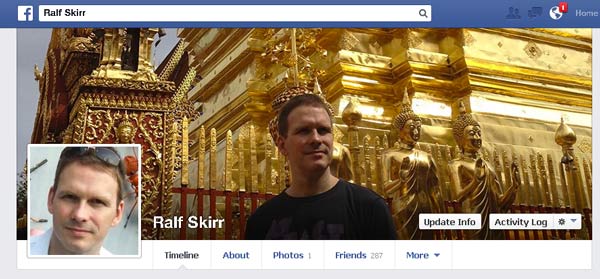
Most small businesses can also use their personal profile to market their business.
Here are some of the aspects which make up a solid profile:
- Select a Picture for Your Profile: Social media is all about interaction and a picture can take you a long way when it comes to establishing connections. Choose a picture for your Profile page that places you in a professional light. The picture should be business-like but not so stern that people are not comfortable approaching you.
- Plan the Content You Initially Want on Your Page: In terms of content, your Profile page should be well organized with information which is relevant to your business as well as to other pieces of content. Keep in mind that the content you post on your page should be valuable to others. Remember that no one is interested in what you had for lunch on any given day. Instead, people want to benefit from the valuable knowledge you have to offer in your chosen industry.
- Wall: The Facebook Wall is your primary platform for interacting with other Facebook users. Use the Wall to post high quality and relevant content which is valuable to the audience you are trying to attract. Additionally, make an effort to interact with other users by commenting on their activities when it is relevant. Avoid doing this excessively as this can be perceived as spam and people will remove you from their friend list.
- Upload Photos and Videos: Use photos that add credibility to your business such as your earnings or photos which are relevant to your business, product, or service. Change the photos often to maintain ongoing interest in your page. When you post a video, make sure it contains valuable information related to your business. The video should be informative and add some kind of benefit to the viewer such as how to do something. Our IT Department has a good example of
- Start Adding Friends: Once you have created your profile, avoid sitting back and waiting for people to notice your page. Instead, make it a daily habit to add new friends and before long you will start receiving friend requests. Keep your new friends under 30 per day otherwise you may be removed from Facebook.
What is a Fan Page?
 Once you have established a personal Profile page and started interacting with other users, you should setup a Fan Page.
- A Fan Page is used by businesses to promote their brand and establish interactivity with their customers.
- A Fan page is also a very powerful way to find new leads and establish long term relationships.
People that become Fans of your page can interact with the content you post such as videos, discussions, product status updates, and more.
You can also use your Fan Page to highlight fan content which shows your appreciation for their business and provides a way for you to give back to the Facebook community. When you help people on your Fan page with a customer problem, others will notice and then you will start getting referrals.
A guide to setting up a fan page can be found on Facebook here.
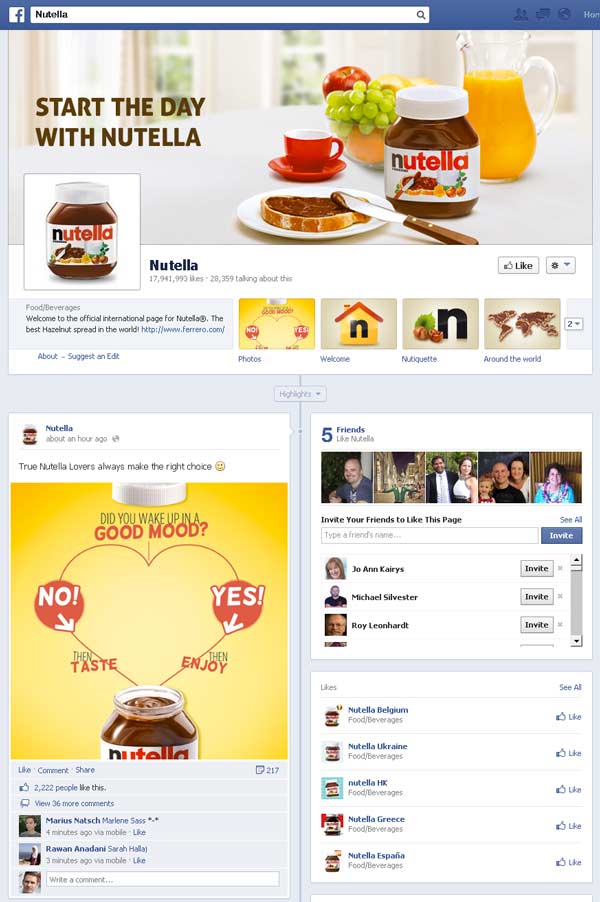
A Facebook business page. Large brands don’t use personal profiles.
What are Facebook Groups Used For?
Another way you can interact with other Facebook members is by establishing a community of members who share a common interest which is your specific product or service.
You can leverage your Facebook Group to facilitate discussions on topics which surround your product or service, as well as offer valuable advice and relevant information to your client base. By forming a community where people feel they belong, this naturally promotes your business without being “salesy.”
How Can Facebook Events Help My Business?
Events on Facebook are beneficial in connecting with your target audience and provide you with a way to invite fellow users to your events. You can easily create an event related to your business individually or you can do it from your Profile page.
This provides you with the opportunity to add value by providing training sessions and other information that your target audience will find valuable. It is also okay to invite people to your event that are not on your friend list or your Fan Page since Facebook Events are all about bringing people together.
Check out the official Facebook events help page here
What is Paid Facebook Advertising? How Does It Work? Is It An Effective Form Of Advertising? How Much Does It Cost?
Paid Facebook advertising is similar to Google pay per click advertising where you only pay for each person that clicks on your ad.
Unlike conventional advertising, Facebook advertising allows you to target your ads to a very specific audience which ensures you are making the most of your advertising dollars.
Facebook uses precise metrics which provide marketers with the intelligence they need to find the right audience. The metrics include responder demographics which target a specific age, geographic location, and gender, as well as other metrics which help you to market to a very specific audience.
Facebook metrics are also designed to help you target paid ads according to user profiles which reveal specific interests, hobbies, favorite TV shows and movies, books, and other types of interests.
This ensures that you do not waste money on advertising that doesn’t work.
How Does It Work?
As an online marketer you pay Facebook to display ads to a specific audience which may have an interest in your product or service.
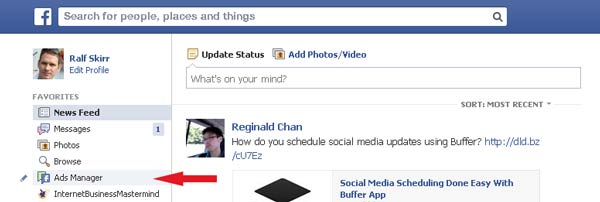
Once you sign up for advertising, Facebook provides you with an interface which walks you through setting up your first ad. The steps are:
- What Would You Like to Do? This is the initial section which allows you to decide what you are seeking to achieve with advertising such as attracting new leads, getting more page Likes, increasing responses for an Event, or setting your bidding options for cost per click (CPC) and cost per thousand ad impressions (CPM).
- Reach the Right Audience: This step involves choosing your target audience according to location, age, and gender. Facebook walks you through setting the demographics for targeting your intended audience.
- Campaign, Pricing, and Scheduling: This step provides you with a way to name your marketing campaign, set your advertising budget, and then schedule your campaign. If you have not selected Advanced Options in this step, you will pay for ad impressions. This means the number of ad impressions which are shown to people who are most likely interested in your product or service. Once your pricing is set, you will never pay more than what you budgeted for and you will never exceed the actual cost required to reach the audience that is likely to be interested in your product or service.
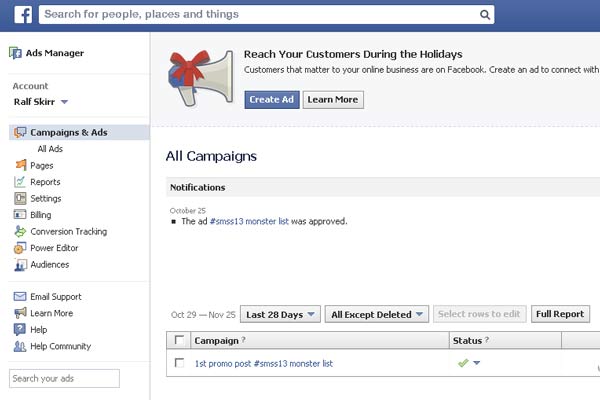
The interface to manage your Facebook ad campaigns.
Once you have been stepped through the above process, the advertising interface will allow you to test multiple ads to see which one produces the best response.
This is also known as split testing and provides you with the marketing intelligence you need to optimize your ads and make the most of ad response rates. It also means you must invest time to monitor the performance of your ads in the Ad Manager interface.
Is Paid Facebook Advertising an Effective Form of Advertising?
Contrary to what some may believe about advertising on Facebook, it takes time for it to be effective and for you to reap the benefits. It works just like any other effort you put into your business.
You must start with a plan and then invest the time to test and analyze your advertising campaign.
Although there are millions of people on Facebook, if you fail to target the right members, you will end up with ad click throughs that do not convert to long term clients.
Facebook advertising can be a very effective form of advertising provided you know how to use it properly. This requires a working knowledge of keyword research, pay per click advertising, and marketing research to discover exactly what your target audience wants.
Then you must take the time to learn the ropes using the Facebook Ad Manager and carefully monitor and continually optimize your advertising campaigns.
How Much Does It Cost?
 The cost of a paid Facebook advertising campaign depends upon how you set it up. Overall, you should find Facebook advertising very cost effective and in most cases, you can pay just pennies per click.
The nice part is you decide how much you want to spend on advertising and then you can set up the campaign to run according to a daily advertising budget, individual campaign budget, CPC (Cost per Click), CPA (Cost per Action, CPM (Cost per Thousand Impressions), or a multiple ad campaign.
The advantage of paid Facebook advertising is you always have a handle on your advertising budget plus, it is very cost effective especially for a small business. The cost can range anywhere from 30 cents per click, action, or ad impression and range as high as a $1 or more USD. Then you only pay for the clicks or impressions you receive up to the budget limit you set for the campaign.
More information can be found here
Who is Paid Facebook Advertising Suitable For? Who Should Use Facebook for Advertising and Who Should Stay Clear?
Paid Facebook advertising is suitable for business owners who are serious about their products and services.
This means online marketers who have invested the time to interact on Facebook as well as give back to the Facebook community. Although you can use Facebook advertising to build your client base, it helps your credibility if you have taken the time to establish a Facebook presence. This instills trust in the people that click through your ad and helps to increase the probability of converting ad click throughs to long term clients.
Facebook advertising is not suitable to those who are out to try and make a quick buck. This means online marketers who continually promote their product without giving anything back to the Facebook community. If you are simply on Facebook for the advertising, eventually other members will see through to your motive and you will be out of business faster than you anticipate.
How Can I Use Facebook to Naturally Promote My Products and Services?
If you have taken the time to establish a Profile, Fan Page, and a Group, in addition to creating events and accumulating a friends list, you are well on your way to naturally promoting your products and services on Facebook without having to use a sales pitch.
Outreach to other members of the Facebook community is the first step to naturally promoting your products and services.
It is also necessary to carefully plan your content and continually provide valuable information to your clients. This helps you to make the most of features on Facebook such as the Like button which allows you customers to share your content with their friends. If you continually offer valuable content, your clients will not hesitate to hit the Like button and make your content known to others.
On the flip side, if you take a genuine interest in the activities of others and make valuable comments, people will be more inclined to visit your Facebook page and reciprocate. This is a natural way to promote your products and services without even mentioning the word “sale.”
Another way to naturally promote your products and services on Facebook is by using Facebook Offers which is completely free to setup. Facebook Offers is a coupon program which allows you to promote a special offer to other members of Facebook. When people visit your page to redeem the offer, they are encouraged to share their experience on their wall so others can see it.
You can also be creative and create your own offers which can be promoted through invitations, events, groups, and other areas where Facebook users will see the offer and respond.
This is a primary advantage of marketing on Facebook because if you do it right, you may never have to do any hard core selling.
Can Media Be Used As An Effective Marketing Tool on Facebook?
Media is an extremely effective tool on Facebook because it adds versatility to your pages and maintains ongoing interest in the information you have to offer. For this reason, Facebook has integrated many different media marketing capabilities into its platform including videos, PowerPoint presentations, SlideShare demonstrations, webinars, and many other media tools which help to maintain your client’s interest and ensures they will keep returning to your page for more great information.
Facebook page for a good example of how presentation videos can be used on Facebook to promote your business to good effect.
What are some of the Best Practices for Facebook Marketing?
As with any other marketing tool online, there are specific guidelines and online etiquette you should use to ensure your marketing campaigns are successful on Facebook.
When you engage in marketing on Facebook, the most important rule of thumb is to remember that social media is all about being “social.” This means that social media is a two-way street resulting in a give and take situation just like you do in relationships in everyday life.
Here are a few do’s and don’ts when it comes to marketing on Facebook:
Do’s
- Do all you can to engage with your friends and potential clients without asking anything in return.

- Continually support other’s activities on Facebook as long as they are relevant to your interests and your business.
- Build a reputation for offering valuable content and the sales will follow.
- Become known as an expert in your industry. When you ask people to Like your posts make sure you provide them with a reason to stick around.
- Invest the time to interact and be consistent with new posts each week. The average is anywhere from 6 to 10 posts per week.
- Answer questions and take the time to respond to posts.
- Keep your customers informed of the latest developments.
- Educate your customers by posting high quality links.
- Always show appreciation and remember to say thank you.
Don’ts
- Avoid posting excessively. After a while your fans will become numb to what you are saying.

- Do not over promote. Make 90 percent of your posts fun and engaging and leave the last 10 percent for promotions.
- Avoid using bad grammar. Using bad grammar sheds a negative light on your business and makes you look unprofessional.
- Do not badmouth your competitors. Avoid expressing opinions about your competitors as this projects a negative image on you and your business and makes you look immature.
- Do not respond in haste. Remember whatever you post online stays online which is why it is important to carefully think about your answers before you respond.
The information in this article should provide you with a solid foundation for getting started with marketing on Facebook. And, remember……if you invest the time, your efforts will be returned to you tenfold with a successful and rewarding business.