The Top 3 Google Analytics ‘Organic Search’ Reports For SEO
I’m always surprised to see how many people think they are doing SEO, but they aren’t actually tracking their efforts.
They are doing their keyword research, optimizing their site, spending time link building, etc etc. But then they call it a day.
They don’t take the time to properly track their results, so they aren’t getting even near the most advantage out of the time they are spending on SEO.
If you have the right reports for SEO, this can help you out with your SEO efforts tremendously. This can help you to know how each of your keywords are performing, what traffic sources are converting the best, etc. This will help you to always be able to reevaluate; to know how you should be concentrating your efforts.
To help make sure you are getting the most out of your SEO, you want to make sure you are using the best tools and reports. And, just like with many other things, Google is always a valuable resource. I have found that Google Analytics provides some of the best reporting tools for SEO.
Here are the top 3 Google Analytics reports for SEO:
1. Organic Search Report - How Many People Came Through Non-Paid Search Results
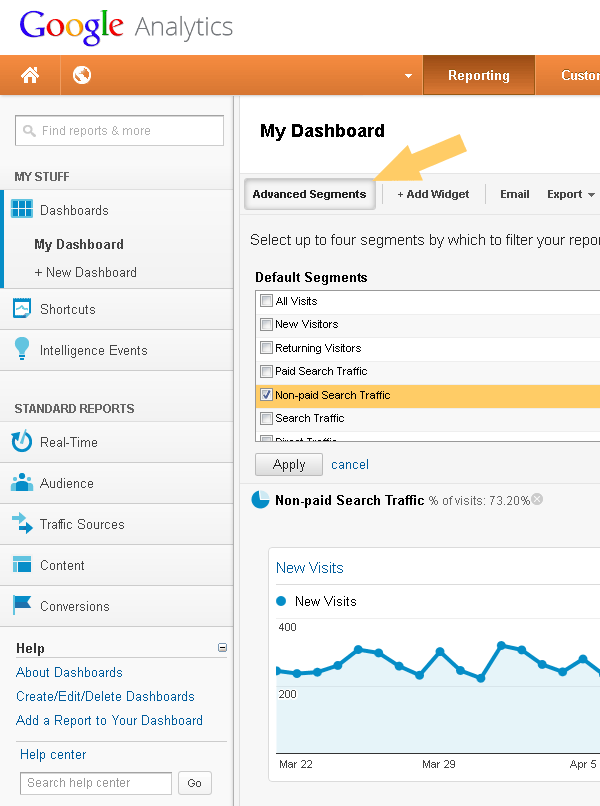
In Google Analytics there is a „Organic Search Engine Report.” This report is a segment that you can create in the Advanced Segments tool. To create this report, you will want to select the „Organic Search Segment” while in the Advanced Segments tool. It’s the fastest way to see how many visitors came through searches.
You can get more details about the referring search engines using the menu on the left.
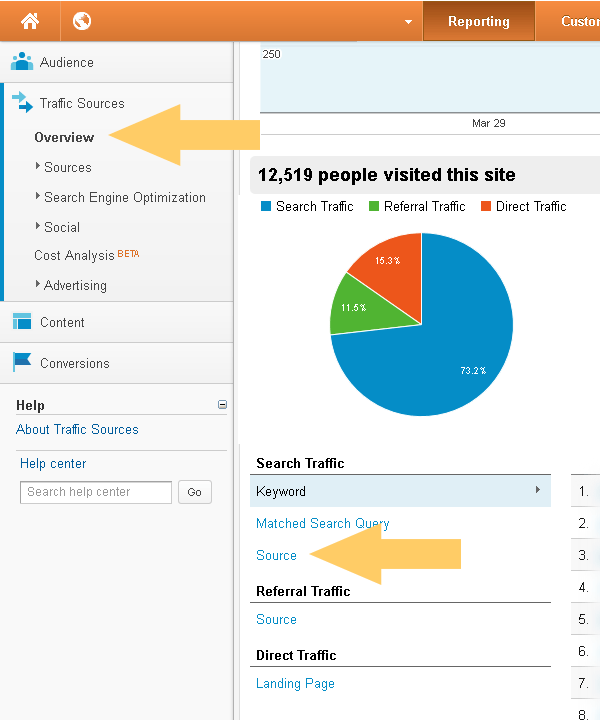
This report will help you to see the details on the traffic you are receiving, broken down by each of the major search engines. You will be able to see what type of traffic you are receiving from each of the major search engines, as well as how this traffic is performing for you. This report will allow you to drill down to each search engine and show you data on traffic bounce rates, conversion rates, unique visits, etc. The data you are able to view in this report will help you to see which search engine is bringing you the most traffic, and which search engine’s traffic is benefiting you the most.

2. Comparing Organic Search Vs. Other Segments Report
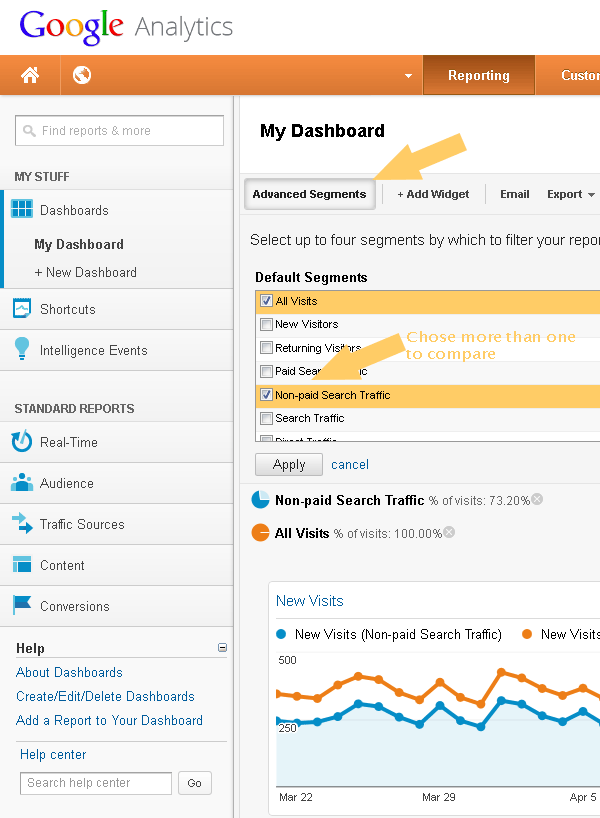
This report is generated by creating another segment in the Advanced Segments tool. This report allows you to weigh your organic search traffic up to the other forms of traffic your website is receiving, in order for you to see how your organic traffic measures up to these other forms of traffic. With this report, you can compare the traffic you are receiving from organic sources versus PPC and other types of traffic.
This will help you to really see how your SEO efforts are paying off compared to your other online marketing efforts. This is yet another report that will help you to reevaluate your efforts and strategies and make any changes where needed. There is also an Organic Search Traffic Share Report that will help you to see what types of percentages of your traffic are coming from SEO, etc.
3. Keywords in Organic Search Report - Which Keywords Searchers Used
This Keyword Report from organic (=non-paid) search will show you all of the data on the different keywords that you are receiving traffic from. You are able to see each keyword’s placements, unique visits, bounce rates, total searches, conversion rates, etc.
This report will help you to see which keywords are bringing you the most and the most valuable (highest converting) traffic, so that you can better concentrate on those keywords moving forward. There is also a Top 5 Keyword report that you can use to view even more data on the top 5 keywords that are bringing you the most traffic.

Conclusion
These are what I think are 3 of the most useful reports that Google Analytics has to offer for SEO. I recommend checking each of these reports regularly to help you get a better grasp on how your SEO efforts are paying off, and to help you constantly tweak those efforts where needed. If you see that your SEO efforts aren’t panning out like you had hoped, you may want to consider looking for professional SEO Services to help you gain better results from your efforts.