How To Create A Productivity Oasis For Work At Home Writers
Work at home writers may have the luxury of working from home, but writing at home can also be difficult due to all the distractions.
Instead of popping open your laptop and working while still sitting up in bed, it’s important that work at home writers create a productivity oasis to keep them on schedule.
So how exactly can work at home writers create a productivity oasis? By using the following tips.
Create an office.
The first thing you absolutely must do is give yourself a designated working area, and no, your bed can’t count.
You need to find a nice quiet place in your home that will allow you to be comfortable and will be quiet enough for you to write without distraction. This room should be away from your kids, away from the kitchen and away from the television, as those are the most distracting aspects of any home.
Invest in ergonomic furniture.
You should also invest in ergonomic furniture for your office. Ergonomic desks, chairs, keyboards and mouse pads are great ways to keep you comfortable while you work.
Since you spend a great deal of time at a computer, it’s important that you avoid injury, such as carpal tunnel syndrome, and using ergonomic office furniture can help.
Create schedules.
The best way to stay on track is to create schedules, calendars or to-do lists to help you know exactly what you need to get done and when. You can use calendars or lists on your computer, or you can even download apps to your mobile devices to help keep you on track.
Every night, write your list of what absolutely needs to get done the following day, and then create your schedule to allow you to complete your list.
Use spelling and grammar checkers.
When your work is grammatically correct and error free, it eliminates the need for rewrites.
This is why it’s extremely important that you invest in a solid spelling and grammar checker, such as Grammarly grammar check tool. While the spelling and grammar checkers on your word processor can help, third-party spelling and grammar checkers like Grammarly have a larger library and more knowledge about proper spelling and grammar, helping to find and fix more errors. Plus, tools like Grammarly will also give you suggestions on how to improve your writing.
When you use these tools, your writing will be better, which will help you be more productive because you will spend less time on edits.
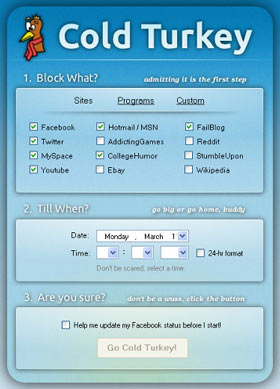 Invest in Cold Turkey or Self Control.
Although you may have taken the time to eliminate distractions around your home office, your computer provides another set of distractions. You may easily find yourself traveling to Facebook, Pinterest, or other websites instead of working, and that can cause you to stop being so productive.
Cold Turkey is a website dedicated to keeping you from wandering to other websites while you’re supposed to be working, but it only works for Windows users. If you’re running a Mac, you can use Self Control. These are great ways to keep you on track and productive.
[rms] Ralf’s comment: I love the recommendation of Cold Turkey. Checking email and browsing my social media accounts is definetely the number one productivity killer for me. I’m downloading Cold Turkey right now!