SEO Link Building - Use Your Competitors To Get Ahead
What SEO tricks are they doing that you aren’t?
Have you ever sat scratching your head and wondering what your competitors are doing that you aren’t?
They seem to be doing better than you, building more links and rising through the search engine ranks to beat you out of the top spots for keywords you are trying to rank for.
How are they managing it?
Do some sleuthing
There are plenty of SEO link tools out there that can be used to analyze the link profile of any website - analyze yours, your competitor’s…it’s all good.
SEOBook has a great listing of Free Link Reputation & Analysis Tools that you visit for additional free and paid tools for link analaysis. 10 commercial (paid) SEO tools with free trials are listed here.
RankPop’s Xray tool is also a great tool designed to search your site for specific keyword opportunities based on your anchor text, page optimization and competition.
Below are 3 of the best known tools, compared in the infographic:
- Open Site Explorer - click here
- Majestic Site Explorer - click here
- Ahrefs - click here
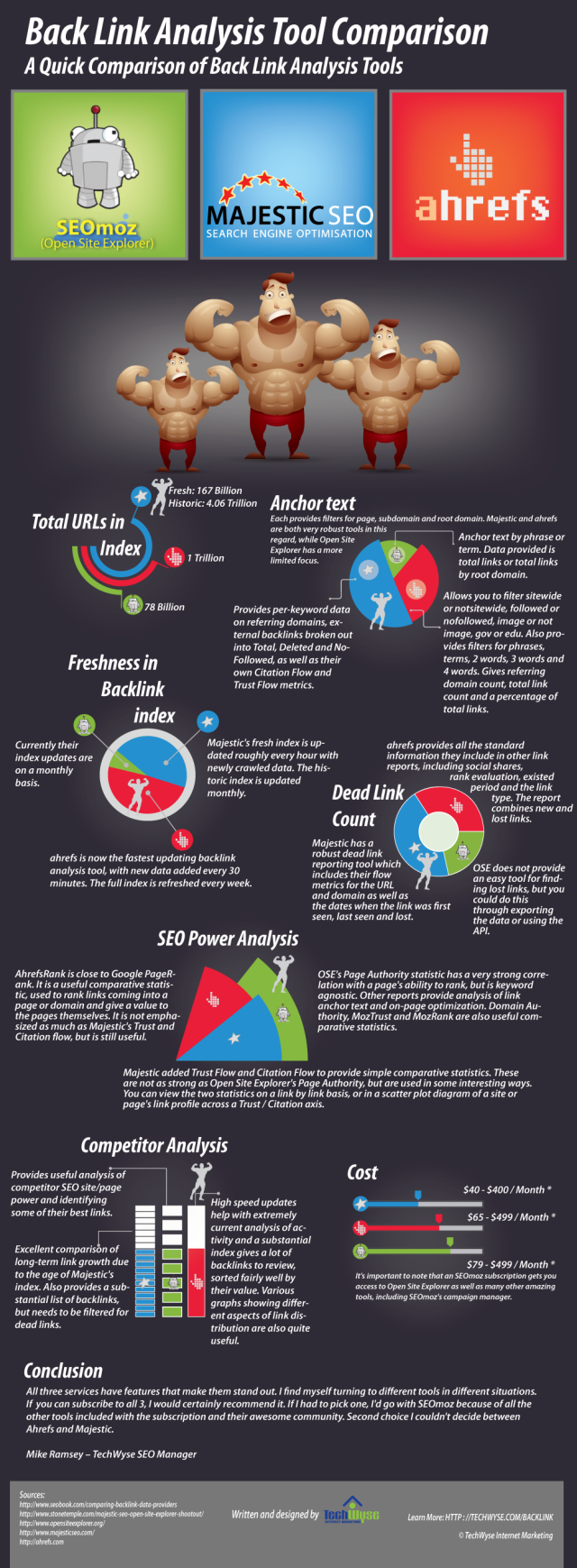
To see the post where this image first appeared, click here
9 Steps to successful competitor link analysis
Think of the process of identifying your best link building opportunities as though you were weeding a garden.
Your goal is to eventually have rows of lovely plants and flowers and a pile of weeds off to the side, ready for the compost heap.
![9 Steps How To Analyze Your Competitor's SEO Back Links [Infographic]](https://ralfskirr.com/wp-content/uploads/9-steps.jpg)
- Pick a competitor to analyze
This is the easy part. You likely have more than one competitor, so pick someone who has obviously higher rankings than you do. - Select a tool to use
We’ve listed a couple of tools already and linked to an SEOBook page with plenty of other options to choose from! Make sure that you choose something that can export the data in a format that you can use later on. - Check the status of the links found
You’ll want to avoid trying to work with 302 or 404 or parked domain pages. Keep the links that seem to be active and discard the rest. - Remove all irrelevant links
Going through your link list so far, remove any links that are already linking to you, and any that are not linking to your competition. This shouldn’t be difficult if you use one of the tools above. - Rank links by Page Authority
Decide how much Page Authority you want the links you build to have and eliminate any links from your list that are below this value you’ve chosen. - Use a spreadsheet to clean things up
You can use Excel, or an open source version, it doesn’t matter. The goal is to create a list that you can sort at will and use later on. - Let Google work for you
You know the Google Cache? Make it work for you by looking at the most recent cache date for each link you have left on your list at this point. Also consider how many times the page has been cached recently. The more cache entries and the more recent the latest entry, the more important Google considers the page. - Get your hands dirty
Figuratively speaking of course! This stage in the process is the point where you have to go through each link one by one and find any problems links. If you do, toss them. - Sort & Execute
Using the spreadsheet you created earlier (and have hopefully been working with up until this point) and sort the final list according to different properties you’re interested in.
Look at how reasonable the possibility is that you could build a link on a particular page (attainability), the Page Authority value, and the last Google cache date. Any other properties you would like to sort your list by are just fine as long as the spreadsheet can handle them.

Your takeaway
Make sure that you or your SEO company is on top of this sort of competitor research and analysis. The information gained can be extremely useful in helping you meet and perhaps even beat your competition at their own game!
Your competitors have already done the work to prove that there is a link building opportunity in a given location, why not take that information and use it for your own link building efforts?
Videeo: Competitive Link Analysis Tips Using Open Site Explorer
The process list in this post was inspired by the work of Moz.com - hop on over to their site and leave some love if you appreciate their work as much as we do!