Split Testing Explained - What Is Split Testing?
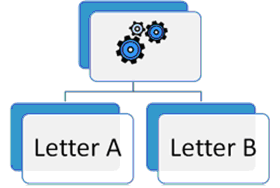 You’re probably aware that split testing is used to make your web site more successful.
Basically you’re testing 2 versions of your web page to find out which one performs better:
- Which of 2 split tested squeeze pages gets the most confirmed subscribers?
- Which of 2 split tested sales letters gets the most sales?
- Which of 2 split tested PPC Ads gets the most clicks?
Most of the work is done by split testing software running on your web site. The only thing you have to do is to setup the 2 versions of your web page. Then the split testing software will control the test, record all data, and show you the results.
In the diagram the split testing software is represented by the gears
- Each time a visitor arrives at the page, the split testing software sends him to one of the two versions of your testing page.
- Each time a conversion happens (for example a sale), the split testing software will collect the information which web page that visitor has seen.
- In the end you simply compare which version created the better results. You pick the winner and put it online, you dump the loser.
The result of your split test may look like this.
| Sales Letter A | Sales Letter B | |
| Visitors to that page | 1024 | 1008 |
| Sales from that page | 7 | 14 |
| Conversion rate | 0,68% | 1,38% |
In this split test sales letter B clearly sells better than sales letter A. So you’d end this split test, you’d drop sales letter A, and continue running the winner, sales letter B.
If you’re smart, you’ll immediately start creating a new sales letter C and running a new split test C against the former winner B.
It’s important that repeat visitors see the same page each time. Otherwise you could not find out which version is responsible for a conversion.
- When visitors arrive at the website, the split testing software checks to see if it’s a repeat visit or not.
- If it is, the visitor is sent to the same sales letter as last time (to ensure the same offer is shown).
- If it’s a first-time visitor, a sales letter is chosen at random, and the visitor is sent there.
- The engine records which sales letter the new visitor is sent to (either by setting a cookie on the visitor’s computer or saving the visitor’s IP address), so return visits can be routed back to the same sales letter.
As you see, it’s not so hard to understand split testing. If you’re just starting out, keep it simple. Don’t hop on super complicated setups for your first test, maybe do something very easy, like just using 2 different headlines.