Top 6 Website Promotion Methods For Google+
You know that social media sites are a great way to boost your visitor count, and Google+ is one of the more interesting sites to be at right now.
When used the right way, Google+ can provide you with great opportunities on how to promote your site and bring in more traffic.
Business owners and marketers who are used to using Facebook and Twitter may have to dig a little deeper to get to know Google+.
It is quite a mystery, but once solved, it will be a very handy tool in your arsenal of online marketing methods. Let’s start.
1. Create a Business Page
The first thing to do is to create your Google+ business page, but you will need a G+ account first. The process is very similar to creating a Facebook page. When creating your business page, add the business category, location, tagline and introduction. Pick a good profile image and get a great cover photo, one that is 2120 x 1192 pixels big.
To promote your site from just your profile alone, don’t forget to include your website address or URL in the introduction section. Also, add a call to action and say why your visitors should go to the site. In the Links section of your profile, put the URL of your business website again.
2. Make Your Circles
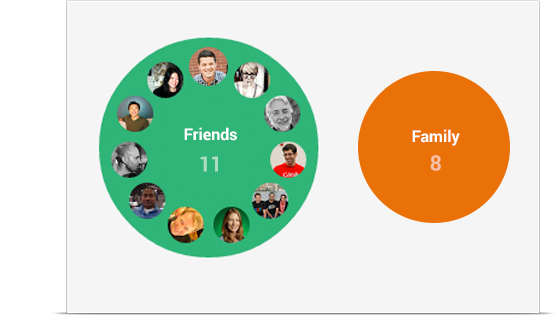
In G+, circles is the term used for grouping people. You can make your own circles, segment them (your followers won’t know who’s in what circle). You can create circles like customers, wholesalers, retailers, partners and etc.
The advantage of making circles is that you can target your post to a specific group of people only. That way, you can provide the most useful and relevant information to a circle.
For instance, if you have people interested in productivity tools then you can target them very tightly and not bother your other contacts.
3. Get Into Communities
Google+ Communities are groups, somewhat similar to Facebook groups, and it’s completely different from Circles. Communities are like interactive forums that you can engage in. This can help you expand your reach with your audience and widen your network as well. From a business standpoint, you can think of Communities as a marketplace, but of course, with less personal interaction yet, easy access to information.
You can surely find a community that is related to the niche of your business. If you’re into carpentry, search for that and then join a few groups that are most relevant to what you’re selling. Join in the discussions, make comments and share posts. Not only will this expand your network, you won’t notice how easy it is to develop new customers as well.
Here’s an example of a successful Google Plus community for bloggers.

4. Promote with Content
You’ve built your page, created circles and joined communities, the next thing to do is to start promoting with the use of content. Over and over again, you’ll hear that you only need to post useful, relevant and valuable content … that’s because it’s true.
The post can be shared with your circle or let the website visitors share the post themselves.
While you share all your web content on your page, you can also promote your Google Plus page within your web content. Providing a direct link to your G+ page is a good tactic.
For your web site, Google will give you some code to embed a badge for your Google Plus profile of badge. Here’s an example badge for this blog:
With whatever method of advertising you use, make sure to put the G+ logo to show customers that they can look up your network and get to know more about your products from there.
5. Connect and Respond
One important reason why you’re on social media is to easily respond and connect with your potential and existing customers. But, it’s not enough that you engage in conversations, you have to guarantee that your customer has a positive experience.
Respond in a timely manner in your Google+ page.
Your customer service is a promotional method for your business in itself.
6. Use Your Other Social Network Accounts
This post isn’t about abandoning your other social media campaigns, but to just add something to the mix. Using them all together will help you achieve the highest potential to drive traffic to your site and more successful promotion.
So when your Google+ page is settled, go to your Facebook and Twitter account and let the people know about it. Through this, you are showing your customers that you are very serious about connecting with them in the way they prefer.
Google+ will bring in a whole new set of opportunities for you. But you have to learn to integrate other factors too. Hope these tips will help you out in better promoting your business website through Google+.